
Admission tickets for galas, golf tournaments, and any event, offering seamless ticket sales and guest management.
Tickets Overview
Tickets in Auctria help you manage who's coming to your event, collect payments, and keep everything organized. Whether you're offering simple general admission or custom packages with seating and meal choices, Auctria gives you the flexibility to build exactly what you need.
This section of the guide walks you through setting up tickets, selling them, and managing everything from guest info to refunds.
Getting Where You Need To Be
You can access the Tickets dashboard by clicking Tickets on the left sidebar.
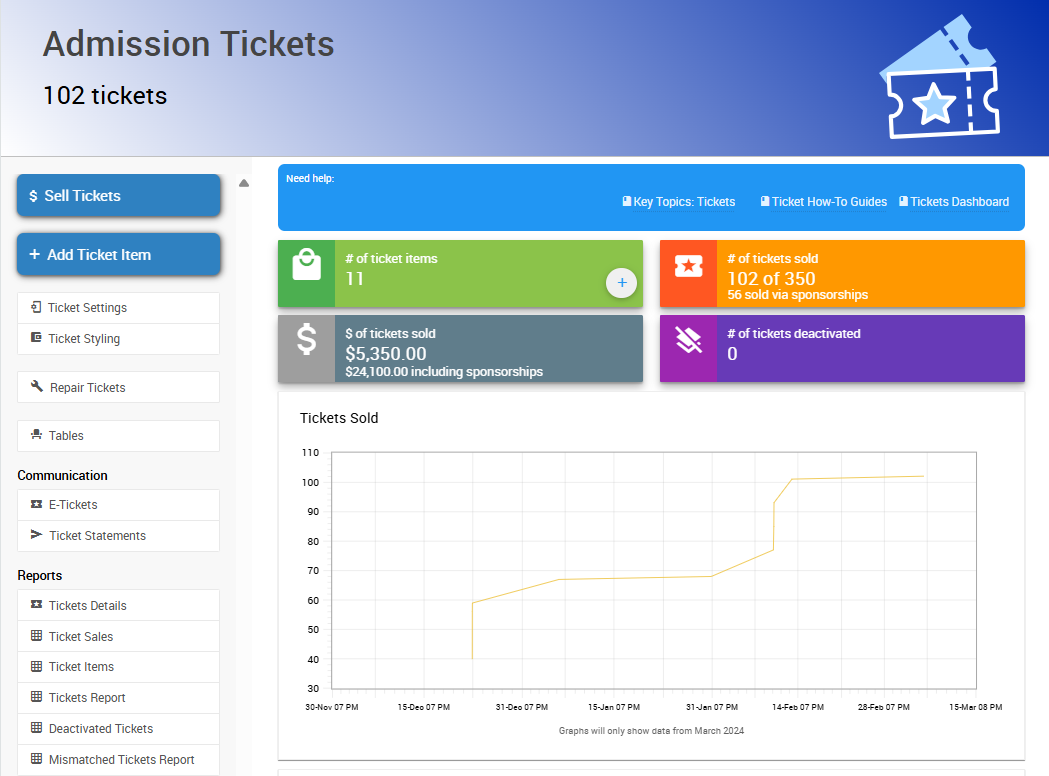
An example Tickets Dashboard from a demonstration event.
What Are Ticket Items?
Tickets are a special kind of item that let you register attendees and gather key details about them. When someone buys a ticket, Auctria automatically creates a participant record and connects their ticket purchase to that profile.
You can create as many ticket types as you like — general admission, VIP tables, couples' tickets, or weekend passes.
Admission tickets only
Only use Tickets for event admissions. Don't use Tickets for other ticket types, such as raffle tickets or drink tickets.
See Adding & Editing Tickets to get started.
Ticket Features You Can Use
Auctria tickets are highly customizable. Here are some of the options you can turn on when setting them up:
| Feature | Description |
|---|---|
| Tables & Seating | Seat guests together and organize your room layout. |
| Meal Choices and Dietary Restrictions | Collect guest meal preferences during checkout. |
| How To Add Early Bird Tickets | Offer discounted pricing for early buyers. |
| Add Different Time & Multi-Day Tickets | Create admission tickets for different event days. |
| Free or Discounted Tickets | Sell free or discounted tickets, such as for teachers, faculty, or staff. |
You can enable any of these features on a per-ticket basis, so your setup can be as simple or detailed as you need.
How Tickets Work in Your Event
Once you've created your tickets, they can be sold in a few different ways:
- From the Auctria dashboard.
- Using the Auctria Admin App.
- Through your event website.
Every ticket sold creates a participant account, so you'll always know who's attending and how they're engaging with your event. You can send digital tickets, manage seating, and handle refunds or reassignments as needed.
See Managing Tickets or Selling Tickets to continue.