
Coupon Codes allow you to offer a discount for online purchases made by your guests.
Coupon Codes (also called discount codes) can be based on a percentage or a fixed dollar amount. They are entered by guests during the online checkout process and applied automatically to their purchase total.
Share Only the Code — Not the Full Value
When providing coupon codes to guests, give them only the part before the colon (:) in the code. For example, for the code teacher:50, guests should only receive teacher.
Setting Up Coupon Codes
Coupon codes can only be added to For Sale items. You can add them when creating the item or later by editing the item's Pricing section.
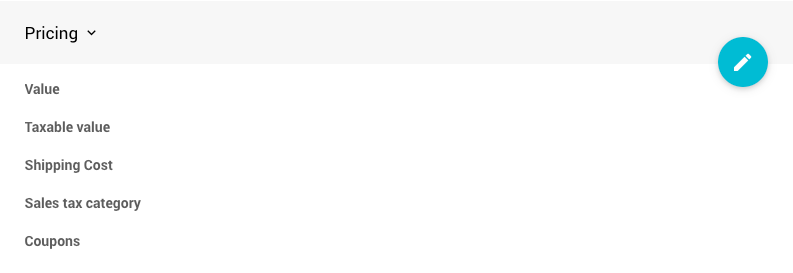
An example taken from a demonstration event.
Enter coupon codes in the Coupons field. To add multiple codes to the same item, separate them with a comma — for example: teacher:50,staff:$25,freebie.
Coupon Code Types
| Type | What to Enter | Example | What the Guest Enters | Result |
|---|---|---|---|---|
| Percentage discount | code:N | teacher:50 | teacher | 50% off |
| Dollar amount discount | code:$N | staff:$25 | staff | $25 off |
| Free item | code | freebie | freebie | 100% off (no charge) |
| Maximum discount | code:N/max=$N or code:$N/max=$N | FACULTY:$50/max=$50 | FACULTY | $50 off, up to $50 maximum per transaction |
Multiple Coupons Per Item
You can add multiple coupon codes to a single item. Guests can only apply one coupon per purchase — they cannot stack codes — but the discount applies to the full quantity purchased. For example, applying staff to a purchase of four tickets gives 50% off the total price.
Coupons Are Applied Per Item Per Transaction
Coupon discounts apply individually to each item in a transaction. If a guest runs two separate transactions, the discount applies each time. If two different items have the same coupon code, it applies to each item individually.
Setting a Maximum Discount
Add /max=$N to the end of a coupon code to cap the total discount per transaction.
For example, TEACHER:$50/max=$50 gives $50 off per ticket, but caps the total discount at $50 regardless of how many tickets are purchased. If a guest buys two $100 tickets using this code, the final cost would be ($100 x 2) - $50 = $150.
Coupon Code Examples
Free Item
To make an item free for guests with a code, enter only the code name with no value. For example, a code entered as freebie gives 100% off — the guest enters freebie at checkout and pays nothing.
Percentage Discount
To give 50% off to guests who are actively involved in auction preparation, use a percentage-based code such as staff:50. The guest enters staff at checkout and receives 50% off their purchase.
Teacher, Faculty, or Staff Tickets
A common use case is offering free or discounted tickets to teachers, faculty, or staff. For example:
teacher:50— 50% off for teachersstaff:$25— $25 off for staffFACULTY:$50/max=$50— $50 off for faculty, capped at $50 per transaction
You can combine these into a single item: teacher:50,staff:$25,FACULTY:$50/max=$50
When sharing codes with recipients, remember to give only the part before the colon — for example, teacher, staff, or FACULTY.
Multiple Discount Codes
Multiple codes can be added to one item, providing different discounts for different groups. For example, volunteer:25,staff:50,board:100 would give volunteers 25% off, staff 50% off, and board members a free ticket. Guests can only apply one code per purchase.
Maximum Discount
To cap the total discount per transaction, add /max=$N to the code. For example, SUPPORTER:50/max=$75 gives 50% off but limits the total discount to $75 — useful when selling multiple quantities where you want to limit the overall savings per transaction.
Guest Experience
Guests will see an Apply Coupon Code button during the Review step of the checkout process.
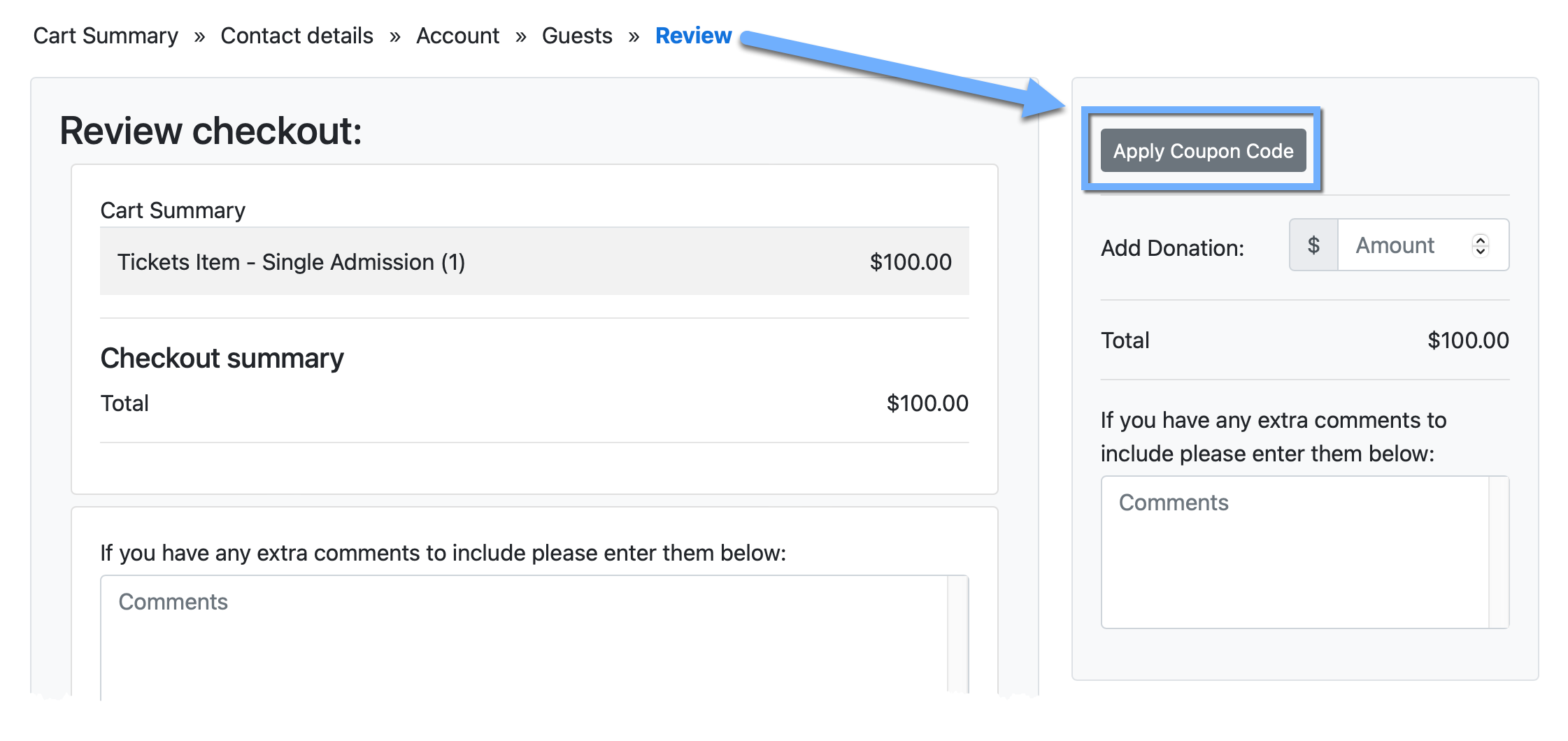
An example taken from a demonstration event.
Once a valid code is entered, the discount is applied and the Total updates immediately.
Coupons Require Immediate Payment
Coupon codes only apply when the item's Online Purchase Behaviour is set to Immediate Payment Only. Discounts will not be applied to items added on account.
Tracking Coupon Usage
You can track coupon usage in a couple of places:
- The Bidder Activity page shows purchases at the discounted price.
- The History tab on the Bidder Details page shows which coupon code was used and the discount applied.
Discount details are also included in the receipt emailed to the guest and in the purchase notification sent to your organization.