
Learn how maximum bidding works in Auctria — including how to enable it, its rules and limitations, and how guests can use it.
Also called Max Bid (formerly Proxy Bidding).
When enabled, the Maximum Bid feature allows bidders to set the highest amount they're willing to pay for an item. Auctria will then bid on their behalf automatically, placing the minimum bid needed to keep them in the lead — up to their maximum amount. This feature is only available for Online Bidding type items.
See Maximum Bidding for setup and configuration details.
Multiple Winners items
Maximum Bidding does not work with items using the Multiple Winners option. A maximum bid placed on a Multiple Winners item will be recorded as the actual bid amount.
Enable Maximum Bidding
To enable Maximum Bidding, go to Settings > Online Bidding Settings from the main Event Dashboard. You can also search for maximum bidding in the search bar.
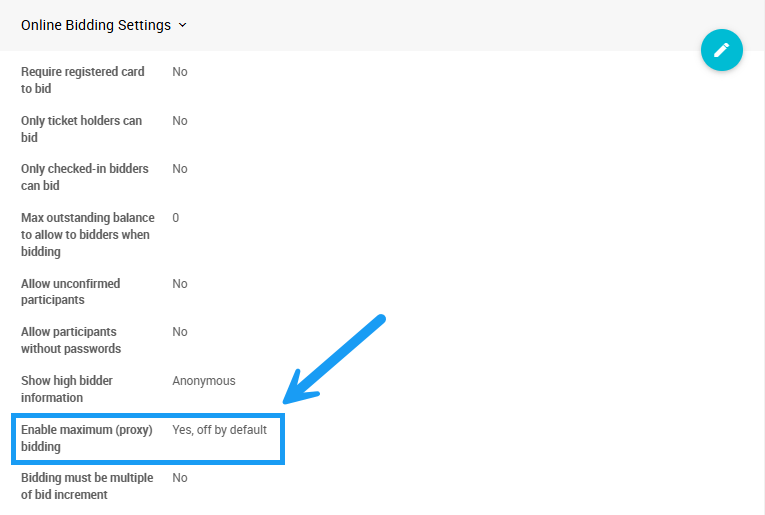
An example from a demonstration event.
Click the pencil icon to edit the panel and select your preferred behavior from the dropdown.

An example from a demonstration event.
| Option | Behavior |
|---|---|
| Yes, on by default | Maximum bidding is available and enabled by default for all online items. |
| Yes, off by default | Maximum bidding is available for online items, but guests must opt in when placing a bid. |
| No | Maximum bidding is unavailable. |
Turning off maximum bidding mid-event
If Maximum Bidding is disabled after maximum bids have already been placed, it will only affect future bids. Existing maximum bids remain active unless manually removed. See Remove A Maximum Bid for details.
Maximum Bidding Rules
Maximum Bidding applies under the following conditions:
| Rule | Details |
|---|---|
| Item type | Only applies to single-winner Online type items. |
| Bidding type | Cannot be used with Live Bidding Type or Paper Bidding Type items. |
| Bidding window | Cannot be applied outside of the Online Bidding Times set for the event. |
| Multiple Winners | Cannot be used when the Multiple Winners option is enabled for an item. |
| Buy It Now | Can be placed on Buy It Now Only Items as long as the bid is less than the Buy It Now price. Another guest can still bid the Buy It Now value to win. |
| Raising a max bid | A maximum bid can be raised at any time. For example, if a guest has a maximum of $1,000 and places a new bid for $1,200, the visible bid does not change but their maximum is raised to $1,200. |
There are also some edge-case behaviors to be aware of:
- A bid placed just above an existing maximum bid may fail if the new amount lands in the gap between the maximum bid and the next bid increment — even if it is technically higher than the current displayed bid.
- Any bid over a maximum bid wins as long as it is at least one increment over the previously visible bid. The new bid displays as one increment over the previous maximum bid if possible.
- Maximum bids are still applied when the Record Bid function is used on an Online type item that has an existing maximum bid.
- Maximum bidding is available in Kiosk Mode, but the What am I winning option does not display maximum bids in Kiosk Mode.
Items with a reserve price
When an item has a Reserve Price set, a maximum bid will be raised automatically until it reaches or exceeds the reserve (accounting for bid increments). If the reserve is not met, the maximum bid will still be used to set the current bid for the item.
Text Bidding and Maximum Bidding
When text bidding is enabled, bids placed by text follow the event's Maximum Bidding settings by default. See Bidding Behavior for more details.
With Maximum Bidding enabled, all text bids are treated as maximum bids.
Example: An item has no current bid, a starting bid of $10, and a bid increment of $10. A text bid of $40 sets the current bid to $10 and will be raised automatically up to $40 as needed.
Maximum Bidding Examples
See worked examples of how maximum bidding plays out in practice, including how the system handles competing bids and bid increment edge cases.
See Maximum Bidding Examples for details.
Changing a Maximum Bid
Guests can view, update, or remove their maximum bid from the My Account page on the event website.
See How To Change A Maximum Bid for details.