
How To Correct Participant Email Typos
Learn how to correct participant email typos.
Email typos are a common data entry issue, but they're straightforward to fix. There are two approaches depending on the situation: having the participant re-register, or correcting the record directly as an organizer.
Participants Cannot Change Their Own Emails
Participants cannot update their own email addresses — email is a critical identifier in Auctria and changes must be made by an organizer.
Option 1: Participant Re-Registers
The simplest fix is to have the participant re-register using their correct email address.
Once they've re-registered, we strongly recommend merging the old record (with the misspelled email) into the new one to keep your participant list clean and activity consolidated.
See How To Merge Participants for details.
Option 2: Organizer Updates the Record
If the participant has a registered credit card, meal choice, or other details attached to their record that would be inconvenient to re-enter, you may prefer to correct the email address directly.
Check for Duplicate Records
Before making any changes, confirm the participant hasn't already re-registered with their correct email address. Auctria does not check for conflicts when an organizer updates an email — if two records exist with the same address, the participant will have trouble logging in.
If a duplicate record exists, merge the two records before proceeding and let your guest know which Paddle# to reference going forward.
See How To Merge Participants.
Update the Email Address
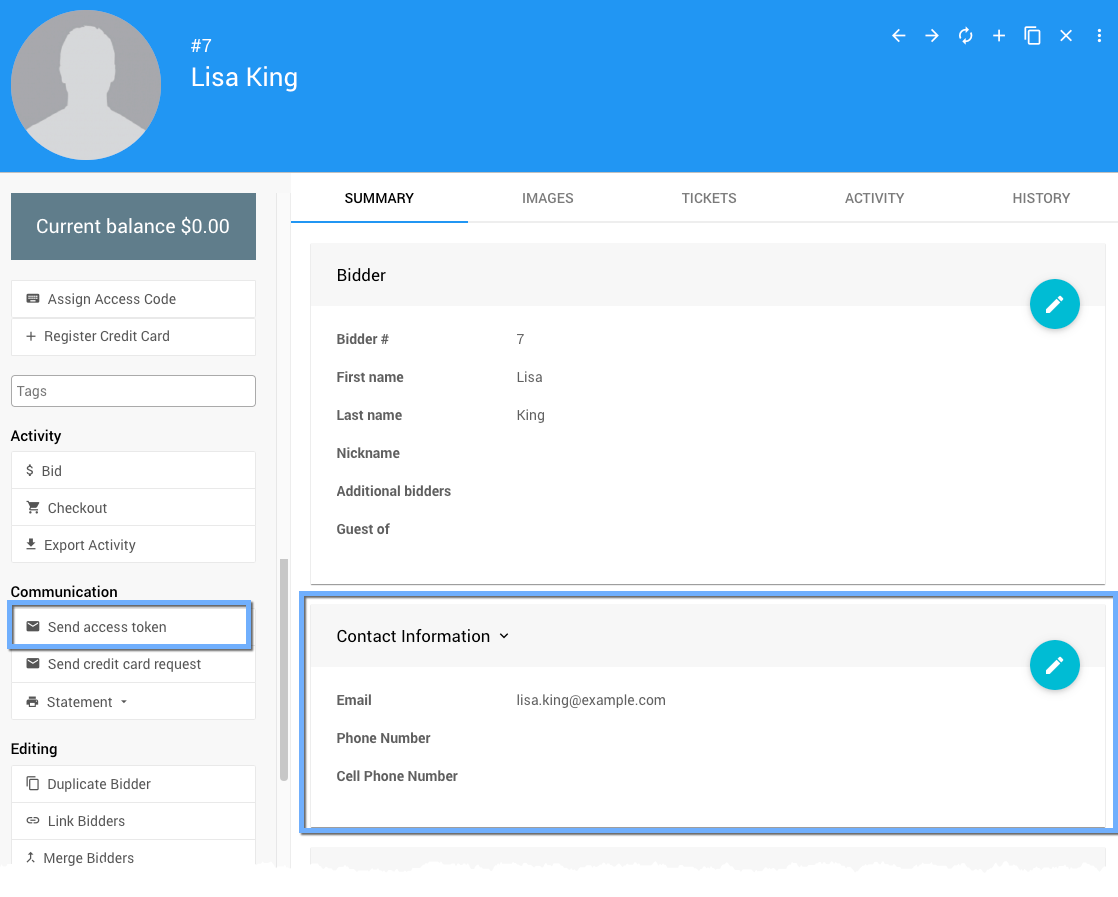
Open the participant's record and go to the Summary tab. In the Contact Information section, click the pencil icon on the right to edit the details and update the email address.
Reissue the Access Token
After saving the updated email address, click Send Access Token to send the participant a fresh link to access the event website.
My Account Page
We strongly recommend advising your guest to visit their My Account page to set a password for their corrected email address. This ensures they can still log in if their access token expires (tokens are valid for 10 days after being issued).
Last reviewed: March 2026