
Payment Processors
How to accept credit card payments with Auctria using Stripe or Authorize.net.
What Are Payment Processors?
Payment processors are services that securely handle credit card payments. Auctria works with two payment processors: Stripe and Authorize.net. When bidders pay with a credit card in Auctria, the payment is processed through your account with one of these services.
Important
Auctria never stores credit card information or processes payments directly. Everything goes through your Stripe or Authorize.net account for security.
Using Stripe (Recommended)
Stripe is our recommended payment processor because it's easy to set up and works well for most organizations.
How it works:
- You create a free Stripe account
- You connect your bank account to Stripe so they know where to send your money
- You link your Stripe account to Auctria
- When bidders pay by credit card, Stripe processes the payment
- Stripe deposits the money into your bank account (minus processing fees) within 2-5 business days
Stripe Fees
Stripe charges a small fee for each transaction. See Credit Card Processing Fees for current rates. Nonprofits may qualify for discounted rates at Stripe's nonprofit program.
Learn more: When Do We Get Paid By Stripe?
Using Authorize.Net
Authorize.net works differently than Stripe. It's a "gateway" that connects to an existing merchant account you already have with a bank or payment provider.
When to use Authorize.net:
- You already have a merchant account with a bank or payment provider
- Your merchant account supports Authorize.net integration
- You're comfortable managing an additional gateway service
Authorize.net Fees
You'll pay fees to both Authorize.net (for the gateway service) and your merchant account provider. See Credit Card Processing Fees for more information.
Setting Up Your Payment Processor Account
Use Your Organization's Email Address
When creating your Stripe or Authorize.net account, use an email address that represents your organization, not a personal email.
Why this matters:
- Volunteers and staff change over time
- Multiple people may need access to the account
- It looks more professional to payment processors and banks
Recommended Email Setup
Best option: Use an email with your organization's domain name, such as:
finance@yourorganization.orgaccounting@yourorganization.orgadmin@yourorganization.org
Avoid: Personal emails like john@gmail.com or jane@yahoo.com
Need a domain? If your organization doesn't have a website domain, they're inexpensive to register. Most domain hosting services also provide email addresses.
Using Organization Domain for Auction Website
Auctria does not provide technical assistance with redirecting a "custom domain," but see Can I Redirect My Website? for advice for contacting your web hosting service to set it up.
What About Square or PayPal?
Square and PayPal cannot be directly connected to Auctria. However, you can still use them at checkout by:
- Processing the payment in the Square or PayPal app
- Recording it in Auctria as an "Other" payment type (similar to recording cash or checks)
See Checkout Payment Options for instructions on adding alternative payment methods.
Also see:
Processing Refunds
If you need to refund a credit card payment, you can do it directly in Auctria or through your Stripe/Authorize.net dashboard.
Refunding in Auctria (recommended):
- Auctria automatically updates your records
- Everything stays balanced
- See Issuing Refunds for instructions
Refunding in Stripe or Authorize.net:
- You'll need to manually record the refund in Auctria
- Otherwise, your records won't match
Important refund facts:
- Refunds go back to the original credit card used for payment
- You can only refund up to the original payment amount
- There's no way to "push" money to a different card
- If the original card was canceled, the card company will handle redirecting the refund
Turning Off Credit Card Payments
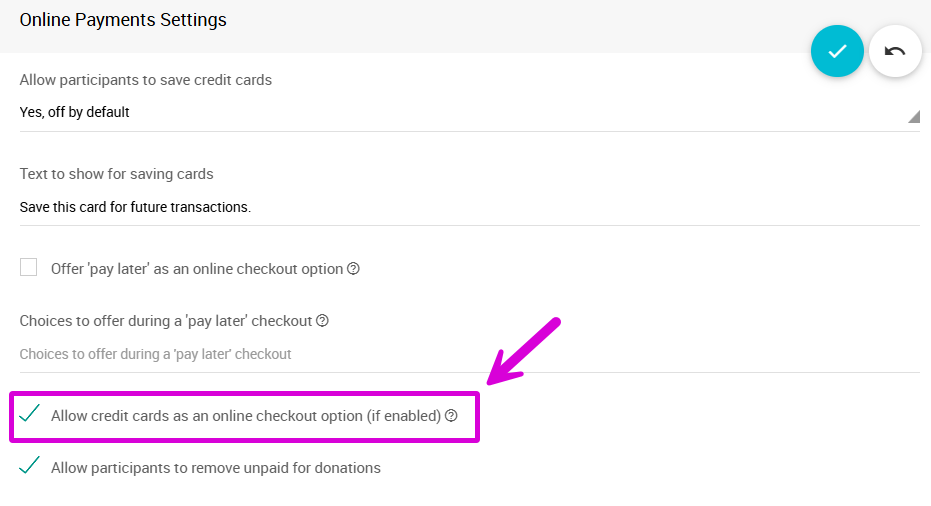
You can disable credit card payments at online checkout while still allowing organizers to charge cards from the event dashboard.
To disable:
- Go to Registration/Checkout settings on the Settings page
- Find Online Payments Settings
- Uncheck the Allow credit cards as an online checkout option (if enabled) checkbox
Complete Removal
You can also completely disconnect Stripe or Authorize.net from your event, but this removes all credit card functionality:
Credit Card Readers
Auctria supports USB credit card readers that help you enter card numbers faster and more accurately. These are different from Square's point-of-sale readers.
Supported readers:
- Standard USB card readers (for faster data entry only)
- Stripe card readers (when using a Stripe account)
See Credit Card Readers And Swipers for compatible devices and setup instructions.
Quick Reference
Need help choosing?
Most organizations find Stripe easier to set up and use.
Getting started:
- Create your payment processor account with your organization's email
- Connect your bank account
- Link it to Auctria
- Start accepting payments
Questions? See our Credit Cards FAQ for answers to common questions.
Last reviewed: January 2026